
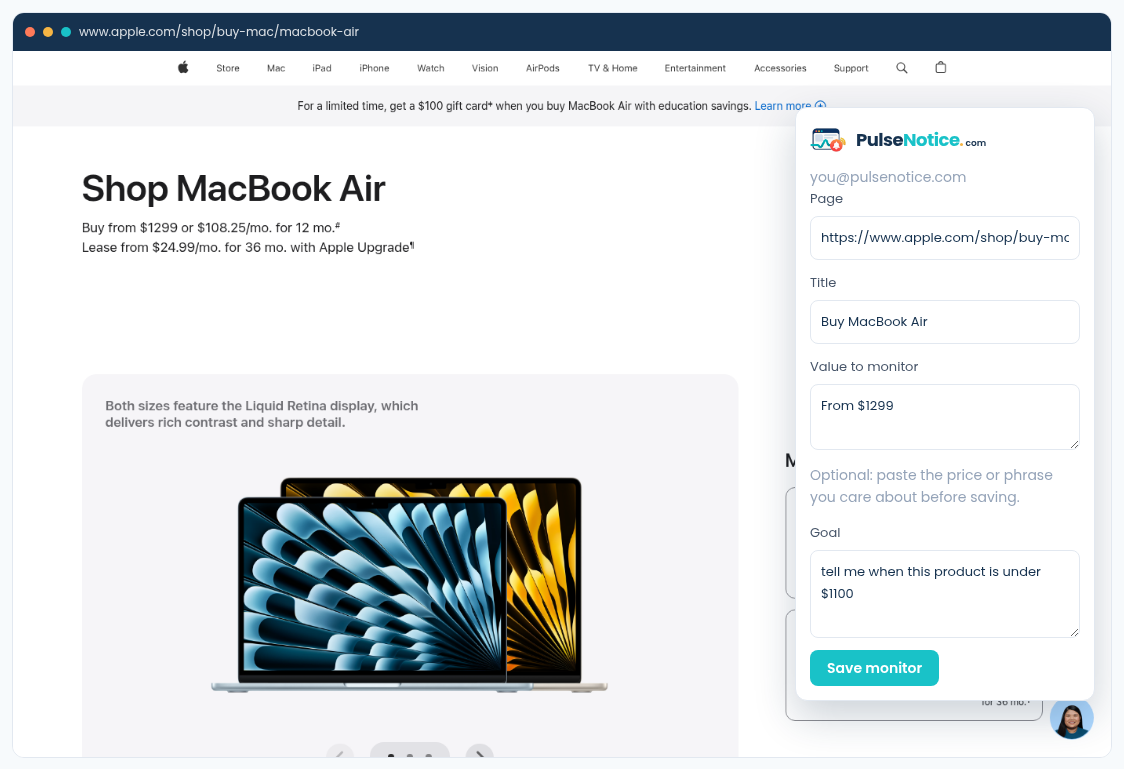
 1. Capture
Open the public product URL. The extension fills page and title; paste the current price as optional selected text and write the threshold goal.
How-to · Prices
You should not have to refresh a product page hoping the number moved. Name a threshold, optionally paste the current price as selected text, and get one email when that condition is newly true. Shipping widgets and countdown timers stay quiet.
Sample goal: tell me when this product is under $1100
Sample selected text: From $1299
1. CaptureOpen the public product URL. The extension fills page and title; paste the current price as optional selected text and write the threshold goal.
Use the public product page, not a cart or checkout that requires a login. PulseNotice fetches what an anonymous browser can see. Gift-card banners and shipping widgets will change often; they are not your goal.
Example: tell me when this product is under $1100. Include the currency amount in the sentence so the compiler can build a price_below-style rule instead of a vague “anything changed” fingerprint.
Optional but useful. That hint helps extraction lock onto the starting price instead of a similar figure in a comparison table or financing calculator.
Create a free account if you do not have one. Email fires when the condition newly becomes true, not on every hourly poll while it stays under. Mark Useful / Not useful on the alert so you can spot remaining noise.