
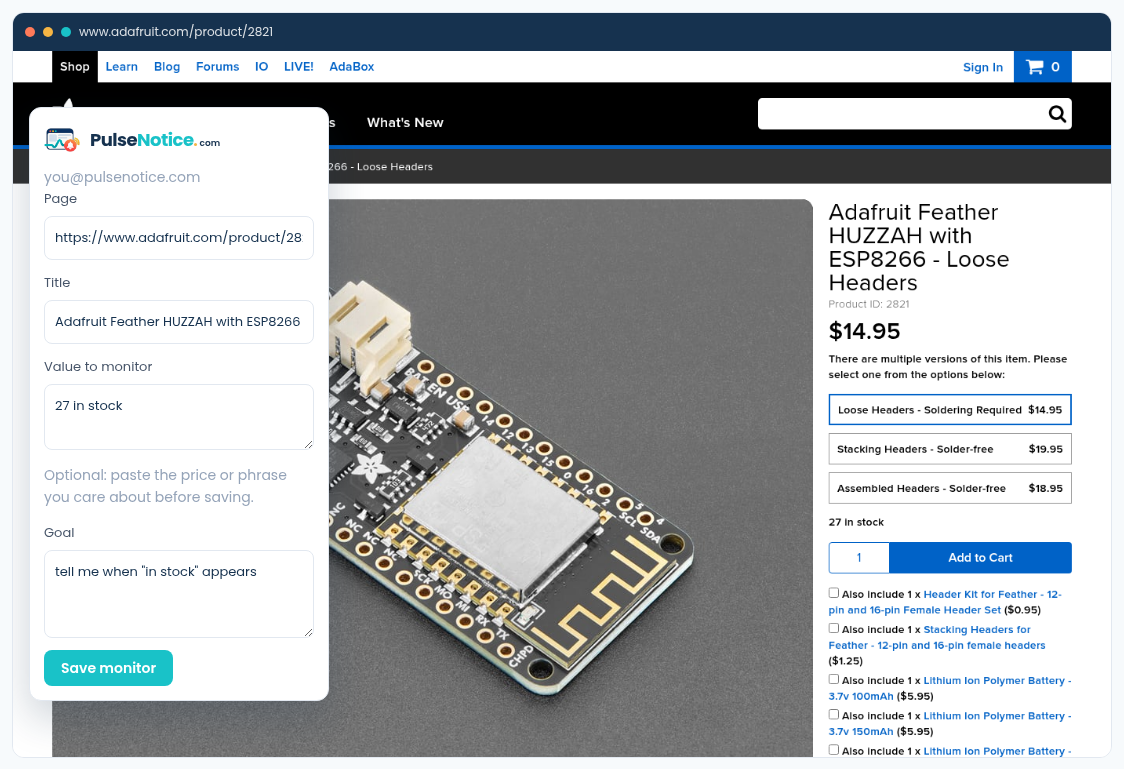
 1. Watch availability
Name the availability phrase you care about. Cookie copy, related-product carousels, and timers are not part of that goal, so they are not part of the fingerprint.
How-to · Noise
Consent dialogs, visitor counters, rotating heroes, and “as low as” financing widgets are the usual false positives in screenshot-diff tools. PulseNotice does not score whether those pixels look important. It extracts the fact in your goal — for example whether “in stock” appeared — and stays quiet otherwise.
Sample goal: tell me when "in stock" appears
Sample selected text: Sold out
1. Watch availabilityName the availability phrase you care about. Cookie copy, related-product carousels, and timers are not part of that goal, so they are not part of the fingerprint.
Screenshot-diff products often ask you to ignore regions or redraw a box after the layout shifts. That is a workaround for a picture-based product. PulseNotice never took that picture as the product — we extract the fact in your goal sentence.
A stock phrase, a price threshold, a job title, or a clause heading. Cookie banners, visitor counters, and promo tiles are not in the goal, so they are not hashed into the satisfaction check. Example: tell me when “in stock” appears.
If the buy box says “Sold out” today, put that in selected text. Extraction gets a lock near the fact you care about even when a consent modal covers other parts of the first paint. The modal itself still does not count as a restock.
After the first real alert, mark whether it helped. Feedback does not train a mystery model on your private pages in this product — it helps you and us see which monitors still need a clearer goal. Keep the goal specific; vague goals invite more noise.